
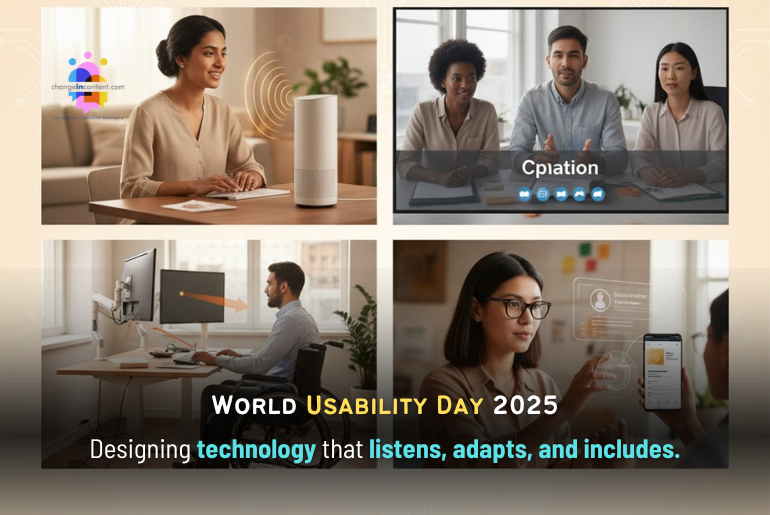
Technology is meant to make life simpler. Yet, for too many people, it still feels like a test of endurance. As we celebrate World Usability Day 2025, themed “Emerging Technologies and the Human Experience,” it is time to ask: Is technology truly serving everyone, or just the few who can keep up with it?
This second part of our World Usability Day coverage explores how workplaces across the world are adopting inclusive, human-centred design. Starting from voice tools that understand multiple languages to adaptive desks that adjust to your needs. These examples prove that when usability guides innovation, technology becomes more than efficient; it becomes empathetic.
World Usability Day 2025: What’s evolving
Let us take a look at what is evolving.
1. Voice User Interfaces
Voice User Interfaces (VUIs) enable people to interact with devices and software via spoken commands. They have become part of everyday life with the rise of smart speakers and assistants like Google Assistant, Siri, and Alexa. You speak, and the device responds.
In India, the next big step is expanding voice-based interfaces in local languages. Many employees in rural or multilingual workplaces still struggle with English-based systems or text-heavy tools. For this to work well, systems must recognise different accents and dialects. People across India speak the same language in very different ways, so the technology must learn those variations.
Conversations in India often move between English and local languages, sometimes within the same sentence. Companies are starting to design for this reality. Jio Haptik Technologies, one of the world’s largest conversational AI firms and part of Reliance Jio, has built AI voice agents that support 22 Indian languages, multiple dialects and accents, and work smoothly across more than ten channels, including WhatsApp and other mobile apps.
Another example is Karya AI, which offers ultra-fast responses with sub-second latency and supports 11 Indian languages with regional accents.
2. Augmented and Virtual Reality (AR/VR)
Augmented Reality (AR) adds digital images or information to what we see in the real world through devices like phones, tablets, or smart glasses. It blends the real and virtual worlds so people can interact with both at the same time. AR and Virtual Reality (VR) have enormous potential to make communication and learning more inclusive.
For people with disabilities, VR can recreate physical environments, allowing them to navigate or practice office routines safely. It can also make onboarding easier by letting new employees explore a virtual version of the workplace before their first day.
AR tools are also making everyday work more efficient and accurate. For instance, DHL has implemented AR smart glasses in its warehouses to guide workers through item picking. The glasses display visual cues and information in real time, reducing errors and improving picking efficiency by nearly 25%. This technology not only boosts productivity but also makes the job easier for workers who may struggle with reading or complex instructions.
3. AI translation & real-time captioning
AI-powered translation and captioning tools make communication more inclusive by breaking both language and hearing barriers. These tools convert spoken words into text instantly, allowing people to follow conversations, meetings, or live events even if they don’t speak the same language or have hearing difficulties. AI captioning is also helpful during training sessions, webinars, and conferences, ensuring no one misses essential information due to language or hearing challenges.
In the workplace, this means that an employee can attend a meeting where someone speaks in English and instantly see subtitles in Hindi, Tamil, or another regional language. Similarly, people who are hard of hearing can read live captions as others speak, making participation easier and more equal.
Platforms like Google Meet, Microsoft Teams, and Zoom already offer live captioning and translation features.
4. Inclusive design in apps and websites
Inclusive design means creating digital products that everyone can use, including people with visual, hearing, or physical disabilities. It focuses on making apps and websites easy to read, navigate, and interact with for all kinds of users.
Tools that follow WCAG (Web Content Accessibility Guidelines) help designers make digital platforms more accessible. For example, features like high colour contrast, readable fonts, voice navigation, and keyboard shortcuts make it easier for people with low vision or mobility challenges to browse and work online.
However, most websites still fall short of true accessibility. A study that analysed over 63,000 websites found that 88% are still not fully compliant with the latest web accessibility standards. The average accessibility score across websites is only around 60 out of 100, and even eCommerce websites, which serve a wide range of users, average only 64 out of 100. Interestingly, websites with an accessibility score of 75 or higher tend to have higher revenue.
Design platforms such as Figma now offer accessibility plug-ins that let teams check their designs for readability and usability before launching a product. This means designers can spot issues, such as the text being too small or buttons being hard to click, and fix them early.
5. Ergonomic and adaptive workstations
An inclusive workplace doesn’t just mean digital accessibility. It also means creating physical spaces where everyone can work comfortably and safely. Ergonomic and adaptive workstations are designed to support employees with different physical needs, making long working hours less tiring and more productive.
Common examples include adjustable desks that let employees switch between sitting and standing positions, reducing fatigue during long work hours. Adaptive keyboards and Vertical Mouse help people with wrist pain or repetitive strain injuries type and navigate more comfortably.
Newer technologies are even integrating AI-driven adjustments. For instance, smart desks that automatically move to a standing position after a specific period of sitting, or lighting systems that adapt brightness to reduce eye strain.
Together, these innovations enable employees with diverse physical abilities to work efficiently, safely, and independently.
When design works for everyone, technology finally works
As emerging technologies continue to influence how we live and work, the focus must shift from what technology can do to what it should do and who it should serve. Usability is about making technology work for people, not the other way around. When a tool understands local languages, adapts to a worker’s physical needs, or provides clear captions and navigation, technology removes friction rather than creating it.
As we celebrate World Usability Day 2025, it reminds us that technology is only as powerful as it is usable.
Changeincontent perspective
At Changeincontent, we believe usability is not a technical standard, but a human one.
From the voices that technology recognises to the hands that use it, inclusion begins in design. The innovations highlighted here (from voice interfaces in 22 Indian languages to adaptive workspaces and AI captioning) are not just engineering milestones. They represent something more essential: dignity in digital experiences.
If World Usability Day 2025 is about anything, it is about remembering that every byte of progress should come with empathy built in.
Disclaimer: The views expressed in this article are based on the writer’s insights, supported by data and resources available both online and offline, as applicable. Changeincontent.com is committed to promoting inclusivity across all forms of content. We broadly define inclusivity as media, policies, law, and history. It encompasses all elements that influence the lives of women and marginalised individuals. Our goal is to promote understanding and advocate for comprehensive inclusivity.
